How to Make Your Shopping Ads Eligible for Google AI Mode (Step-by-Step Guide)
Learn how to make Shopping ads eligible for Google AI Mode, optimize product feeds, resolve blockers, and measure paid versus organic AI visibility.

Andrew Yan
Co-Founder, CEO of AthenaHQ
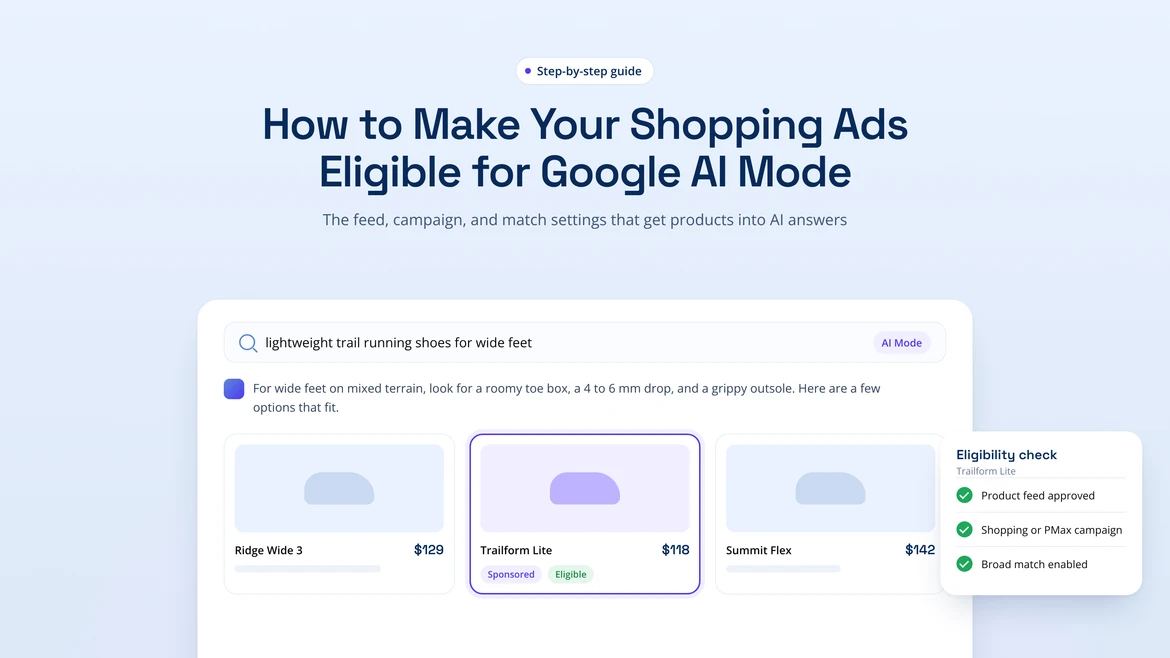
As shopping becomes more conversational, Google AI Mode is changing how consumers discover and compare products.
Instead of searching for “best dog toys,” a shopper might ask Google to recommend interactive toys for an energetic Golden Retriever, compare three options under $50, and narrow the results based on durability, enrichment benefits, and customer reviews. For retailers, these interactions create new opportunities to reach consumers. But appearing in AI-powered shopping experiences requires more than compelling product descriptions or competitive bids.
Your Google Ads account, Merchant Center setup, product feed, and landing pages must meet Google's applicable requirements before Shopping ads can become eligible for consideration. And eligibility is only the starting point. Google still determines which ads to serve based on placement availability, relevance, campaign settings, policies, and auction conditions.
This guide explains how to prepare your Shopping campaigns for Google AI Mode, resolve common eligibility problems, and measure performance. We'll also explore how to complement your paid advertising strategy with generative engine optimization (GEO) to strengthen organic AI visibility. Let’s dive in!
Key Takeaways
- Google AI Mode Shopping ad eligibility depends on an active Google Ads account, properly configured Merchant Center account, approved products, compatible campaigns, policy compliance, and placement availability.
- Accurate product feeds are essential. Titles, descriptions, identifiers, images, prices, availability, and variants should match the corresponding product landing pages.
- Eligibility does not guarantee ad delivery. Google determines whether an eligible Shopping ad appears based on relevance, auction conditions, campaign settings, and other serving requirements.
- Paid Shopping ads and organic AI recommendations require separate measurement. Google Ads and Merchant Center provide advertising performance data, while GEO platforms such as AthenaHQ help brands monitor organic AI visibility.
- Organic AI visibility is highly competitive. AthenaHQ's State of AI Search, Q4 2026 found that leading brands appeared in 55.50% of relevant AI answers, compared with a market average of 15.15%.
What Shopping Ad Eligibility Means in Google AI Mode
Google AI Mode allows users to explore questions through conversational search, including product research and comparisons. Where supported placements are available, relevant Shopping ads may appear alongside AI-generated responses.
To qualify, your account, inventory, campaigns, and landing pages must meet Google's advertising standards. However, participating in Google Shopping doesn’t automatically guarantee visibility in AI Mode. Several factors affect whether your products qualify and ultimately appear:
- Google Ads account: Your account must be active, properly configured, and in good standing.
- Merchant Center account: Google needs access to an approved product source linked to your Google Ads account.
- Product approval: Individual items must satisfy applicable data and advertising policies.
- Campaign participation: An active, compatible Shopping campaign must include the inventory you want to advertise.
- Policy compliance: Your advertising claims and landing pages must comply with Google's requirements.
- Market availability: AI Mode ad placements can vary by geography, language, device, and rollout.
- Auction conditions: Google evaluates relevance, campaign settings, and other serving factors when selecting ads.
Together, these factors establish whether your inventory qualifies for AI-powered Shopping placements and can compete for impressions. Before optimizing for additional visibility, confirm that Google can consider your products in your target markets.
Eligibility Is Not Delivery
A product can meet every foundational requirement and still receive no impressions in Google AI Mode. Eligibility means Google can consider an ad for an available placement, while delivery occurs when it actually reaches a shopper. Several factors influence whether an eligible listing receives impressions, including the shopper's query, relevance, campaign settings, auction competition, and ad inventory.
Google may also introduce new formats and reporting features gradually. Check the latest availability information for your account and market before developing a strategy around specific AI Mode advertising opportunities.
Paid Shopping Placements and Organic AI Recommendations Are Different
Google AI Mode can surface products through paid advertising and organic recommendations. Although both may influence purchase decisions, they operate differently:
- Paid Shopping placements appear with advertising or sponsored labels. Eligibility depends on Google's ad infrastructure, campaign settings, product approvals, and auction conditions.
- Organic AI recommendations occur when Google includes brands or merchandise in an AI-generated response without a sponsored label.
For example, a shopper might ask: “What are the best lightweight carry-on suitcases for international travel?” Google AI Mode could suggest several options organically alongside relevant Shopping ads, where supported. A retailer might appear in either format, both, or neither.
Organic visibility depends on how Google interprets search queries, evaluates product information, and selects sources. Accurate descriptions, structured data, reviews, and useful comparison content can help improve how AI systems understand your offerings.
These practices also contribute to generative engine optimization (GEO), which aims to increase brand visibility in AI-generated answers. However, GEO cannot secure sponsored positions or bypass advertising requirements. Retailers should coordinate both approaches while evaluating their performance separately.
Step 1: Confirm Your Google Ads and Merchant Center Foundation
Before adjusting campaign budgets or optimizing product descriptions, verify that your advertising infrastructure is properly configured.
Account restrictions, disapproved products, and incorrect Merchant Center connections can prevent participation regardless of campaign competitiveness.
Start with the following checks:
Verify Account, Website, and Policy Readiness
Confirm product approval and policy compliance.
Open Google Merchant Center and review your inventory status. Look for disapprovals, limited eligibility, missing information, and account-level notices. Google typically provides diagnostics identifying affected items and the reasons for any restrictions.
A product may be disapproved because of incorrect pricing, unsupported claims, missing attributes, or landing-page problems. Check account-level restrictions separately, as resolving individual disapprovals may not restore broader eligibility.
You’ll also want to verify that Google Ads and Merchant Center are connected, then confirm that the intended account is linked to the Merchant Center source containing your inventory. This allows eligible products to participate in supported Shopping campaigns. If your business operates multiple advertising accounts, websites, or regional catalogs, verify that each campaign uses the appropriate source.
Verify that Google Ads and Merchant Center are connected.
Confirm that the intended Google Ads account is linked to the Merchant Center account containing your product inventory.
This connection allows eligible products to participate in the relevant Shopping campaigns.
If your business operates multiple advertising accounts, websites, or regional catalogs, verify that each campaign references the correct product source.
Check website verification and claim status.
Make sure your website meets Merchant Center's applicable verification and claim requirements. Your submitted product URLs should match the associated domain and lead shoppers directly to the advertised items. Broken links, unrelated redirects, or mismatched merchandise can create eligibility problem
Review destination settings and policies.
Merchant Center allows retailers to manage inventory participation across supported destinations. Check that your listings are enabled for the intended advertising channels, and review any associated restrictions. Also confirm compliance with Google's Shopping policies, including standards for advertising claims, stock availability, and the purchasing process.
Validate the purchase experience.
Visit a representative sample of landing pages to make sure shoppers can identify the advertised item, select the correct variant, see accurate pricing and availability, and complete their purchase.
A technically valid URL is not enough if the page displays contradictory information or prevents customers from completing a transaction. Merchant Center warnings do not always block serving, but they can signal issues that warrant further investigation.
Check Campaign and Market Availability
Once your account and product data pass the initial checks, verify that your inventory is included in an active campaign.
Confirm that an appropriate Shopping campaign is active.
Review the campaign's status, product coverage, targeting, budget, and conversion configuration to make sure your intended products are included. Product groups, inventory filters, or other campaign settings may exclude items even when Merchant Center approves them.
Verify availability in your target market.
Google's AI advertising experiences may not be available in every geography, language, device environment, or account, so be sure to review current rollout information to determine whether your intended market and campaign configuration support the relevant placements.
Test the complete product data path.
Select a representative product and trace it through the entire process:
Product source → Merchant Center → Product approval → Shopping campaign
This exercise helps identify where exclusions or restrictions occur. For example, Merchant Center might approve a product, but an inventory filter could prevent it from participating in the associated campaign. Updating its description wouldn't fix that configuration problem.
Complete these foundational checks before moving on to feed optimization.
Step 2: Make Your Product Feed Ready for AI Shopping
Consumers are asking specific questions, which means complete and accurate attributes are becoming increasingly important. Your product feed provides the structured data Google needs to identify merchandise, verify its details, and match listings with relevant searches.
Let’s take someone searching for “a waterproof hiking jacket for women that's lightweight enough for summer travel.” A listing that specifies the jacket's material, weight, sizing, and weather protection is more useful than one with a generic name and minimal details.
Although Google may use these attributes differently across shopping experiences, maintaining consistent, comprehensive records helps establish a reliable foundation for advertising.
Supply Complete, Consistent Product Attributes
Review the following fields for every applicable product.
| Product attribute | What to optimize |
| Product identifiers | Supply accurate GTINs, MPNs, and other applicable identifiers. |
| Title | Include the product name and meaningful differentiators, such as model, size, material, or color. |
| Description | Explain the product's relevant features and specifications using factual language. |
| Image | Show the correct product or variant with clear, accurate imagery. |
| Product URL | Link directly to the corresponding product page. |
| Price | Match the amount customers can actually pay on the landing page. |
| Availability | Reflect current inventory status. |
| Brand | Identify the correct brand or manufacturer. |
| Condition | Accurately indicate whether the item is new, used, or another applicable condition. |
| Variant details | Distinguish available sizes, colors, patterns, materials, and configurations. |
| Category | Classify products accurately using the applicable category information. |
Avoid stuffing product titles with repetitive keywords or promotional language. For example, “Women's Waterproof Hiking Jacket, Lightweight, Blue, Medium” communicates more useful information than “Best Amazing Outdoor Jacket, Top Quality, Great Price.”
Descriptions should also answer the questions shoppers are likely to ask. For a laptop, that might include processor, memory, storage, screen size, weight, and battery specifications. For skincare, relevant information could include ingredients, product type, intended use, and size. Keep every claim accurate and consistent with the actual offering.
Match Every Feed Claim to the Landing Page
Google can identify discrepancies between submitted product data and the information customers see on your website.
Price and availability mismatches deserve particular attention because these attributes change frequently. For example, your feed might list a coffee maker for $89, while the website displays $109. Or a listing may advertise a stainless steel model, but the destination defaults to an unavailable black version. This can create approval problems and frustrate shoppers.
To minimize inconsistencies:
- Synchronize inventory and pricing updates between your commerce platform and Merchant Center.
- Keep product structured data consistent with the information displayed on your website.
- Verify that links direct shoppers to the correct item and variant.
- Check that promotions and discounts are represented accurately.
- Monitor stock levels and other frequently updated attributes for outdated information.
Retailers with large catalogs should prioritize automated data synchronization and regular quality checks, since even a small error rate can affect hundreds of listings across thousands of SKUs.
Strengthen Product Understanding With Reviews and Structured Data
Product feeds are essential for Shopping advertising, but your website also provides valuable details that help search systems interpret your offerings.
Structured data organizes content into machine-readable attributes, including item identity, pricing, availability, and customer ratings where applicable. Keep these details consistent with your feed and the information visible to shoppers.
Reviews provide additional perspectives on real-world experiences, such as durability, performance, and common use cases. For example, the description of an office chair might specify its adjustable lumbar support and seat dimensions, while customer reviews reveal how comfortable it is during long workdays.
Together, these sources can help consumers make informed purchase decisions while supporting organic AI discovery. However, neither reviews nor structured data independently establishes Shopping ad eligibility in Google AI Mode. Instead, they contribute to a broader generative engine optimization (GEO) strategy focused on improving visibility in AI-generated answers.
According to AthenaHQ's State of AI Search 2026, brand domains were cited in an average of just 14.93% of measured competitive AI answers. This underscores the importance of examining which external sources AI systems reference and developing authoritative content that supports brand discovery. For e-commerce retailers, third-party coverage, credible reviews, and accurate merchandise details can all contribute to that effort.
Before You Submit
Use this checklist to review your product data before submitting updates to Merchant Center.
Required Google product-data checks
Start by verifying that your listings meet Google's applicable data quality and eligibility requirements:
- Confirm that applicable identifiers and essential attributes are complete.
- Verify titles, descriptions, images, prices, and availability for accuracy.
- Represent brands, conditions, categories, and variants correctly.
- Test landing page URLs and checkout processes.
- Resolve applicable Merchant Center errors and policy restrictions.
Optional organic visibility improvements
These improvements can strengthen organic product discoverability, but they should remain separate from the requirements for paid Shopping participation:
- Add accurate structured data to relevant pages.
- Publish useful specifications and comparison content.
- Display authentic reviews associated with the correct items.
- Maintain consistent naming and attributes across your website and other channels.
Step 3: Diagnose Why Products Are Not Eligible
Even well-maintained Shopping campaigns can encounter eligibility problems. To resolve them efficiently, identify the underlying cause before making changes. Start with Merchant Center and Google Ads diagnostics to determine whether the issue stems from the product feed, landing page, policy status, campaign configuration, or market availability. Then address the specific restriction and confirm that your updates have taken effect.
| Potential blocker | What to inspect | Corrective action | What to verify next |
| Disapproved products | Merchant Center product and account diagnostics | Correct the identified data, destination, or policy problem. Resubmit where applicable. | Confirm approval and campaign inclusion. |
| Missing or incomplete attributes | Product feed and applicable attribute requirements | Supply accurate information from your product records. | Confirm Merchant Center processes the update. |
| Price or availability mismatches | Feed, structured data, landing page, and selected variant | Synchronize pricing and inventory information. | Recheck approval and live-page consistency. |
| Policy restrictions | Merchant Center and Google Ads notices | Review the stated restriction and correct the affected product, claim, or destination where permitted. | Confirm product-level and account-level compliance. |
| Regional or campaign constraints | Targeting, campaign status, inventory inclusion, and rollout availability | Adjust settings to match the intended market and supported experience. | Verify campaign participation and market availability. |
If your feed contains outdated pricing, updating the website alone won't resolve the discrepancy if Merchant Center continues receiving incorrect values from the original source. Likewise, fixing a disapproved listing won't restore campaign participation if an inventory filter still excludes it. Make sure you always check the correction carried through to every affected system.
After making changes, review the complete data path to ensure each correction has been applied. Keep a simple log of affected items, identified issues, corrective actions, submission dates, and current status. This helps teams spot recurring errors and distinguish outstanding problems from updates still being processed.
Also remember that approval and active campaign participation don't guarantee AI Mode impressions. If the foundational checks pass, investigate placement availability and auction conditions before revisiting the feed.
Step 4: Measure Shopping Results Without Overclaiming AI Mode Reporting
Once your products are eligible for consideration, it's time to evaluate how your campaigns actually perform:
- Are your Shopping campaigns attracting relevant traffic?
- Which products drive conversions?
- Is your advertising spend delivering acceptable returns?
Google Ads and Merchant Center provide the data to help answer these questions, though AI Mode-specific advertising reports may not be separately available for every account or rollout. Make sure to distinguish between overall Shopping campaign results and any visibility they can specifically attribute to AI Mode.
Measure What Google Ads and Merchant Center Report
Start with the campaign metrics available in your account:
- Impressions: How often Google serves your ads.
- Clicks: How frequently users interact with your ads.
- Cost: How much you spend on advertising.
- Conversions: The actions attributed to your campaigns.
- Conversion value: The revenue or other assigned value associated with conversions.
- Return on ad spend (ROAS): Conversion value relative to advertising spend, where configured.
- Product-level performance: Results associated with individual products or inventory groups.
- Merchant Center diagnostics: Approval statuses, warnings, and recurring product issues.
These metrics can help you identify where your campaigns are performing well and where adjustments may be needed. For example, a product with substantial impressions but few clicks may warrant a review of its pricing, imagery, or audience relevance, while traffic without conversions may require a closer look at the landing page or purchase experience.
Take advantage of the reporting segments available in Google Ads. If your account doesn't provide separate data for AI Mode placements, describe the results as overall Shopping campaign performance rather than attributing them specifically to AI Mode.
For more reliable comparisons, keep the product set, geography, reporting period, and conversion definitions consistent. Also document significant changes to budgets, promotions, inventory, and website content.
The biggest improvement is the opening. It now moves more naturally from the eligibility checks in Step 3 into the performance questions readers will want answered, without interrupting the flow with several short paragraphs.
Use a Controlled AI Visibility Benchmark
When dedicated AI Mode reporting is limited, you can supplement your campaign data with a repeatable process for observing product visibility.
Start with a representative set of product-related prompts. For a home furnishings retailer, these might include:
- “Best compact dining tables for small apartments”
- “Affordable ergonomic office chairs for working from home”
- “Compare solid wood and engineered wood desks”
- “What are the best washable rugs for homes with pets?”
Run these prompts regularly under consistent conditions, recording:
- The product categories and exact prompts tested.
- The date, geography, language, and device.
- Whether each visible result is paid or organic.
- Which brands and products appear.
- What information appears alongside each listing.
- How visibility changes between observations.
Over time, you may notice patterns, such as certain products appearing more frequently or competitors gaining visibility. These observations can help inform further investigation, but they have important limitations: manual testing doesn’t reveal complete auction data, measure total impressions, or establish whether your campaigns caused a particular product to appear. Treat the findings as a directional benchmark that complements your advertising analytics rather than replacing them.
Keep Paid and Organic Findings Separate
AI-powered shopping discovery presents two distinct measurement challenges: understanding how your paid campaigns perform and determining whether AI systems recommend your brand organically. Each requires different data sources and metrics.
For paid Shopping placements, use Google Ads and Merchant Center to evaluate campaign performance and product status.
For organic AI visibility, track metrics such as:
- Brand mentions in AI-generated answers.
- Share of voice relative to competitors.
- Product recommendations across relevant prompts.
- Citations and sources associated with AI responses.
AthenaHQ helps brands track and improve their visibility across generative engines, including ChatGPT, Google AI Overviews, Perplexity, and Gemini. For e-commerce teams, it also provides insights into AI-driven product discovery, monitors recommendations, and supports revenue attribution for traffic originating from AI platforms.
These capabilities complement Google Ads reporting by revealing where brands appear in organic AI recommendations and which sources influence their visibility.
AthenaHQ's State of AI Search, Q4 2026 illustrates the competitive stakes. The leading brand in a competitive set appeared in an average of 55.50% of relevant AI answers, compared with 15.15% for the average brand.
Average Brand Mentions in AI Answers
| Benchmark | Mention rate |
| Average brand | 15.15% |
| Leading brand | 55.5% |
That's approximately 3.7X the average mention rate. The report also found that first-place brands averaged 33.03% share of voice, compared with 18.36% for second-place brands and 12.93% for third-place brands.
These figures measure organic AI visibility, not Google AI Mode Shopping ad performance. They demonstrate the value of tracking brand presence in AI-generated recommendations alongside paid campaign results.
By measuring both, retailers can gain a more complete picture of how consumers discover their products during AI-assisted research and identify opportunities to improve visibility across channels.
A Practical Eligibility Checklist to Revisit Before Launch
Before launching a Shopping campaign or making major changes to your product catalog or website, run through these ten checks.
- Confirm account readiness. Verify that Google Ads and Merchant Center are active, connected, and free from unresolved account-level restrictions.
- Confirm campaign readiness. Make sure an appropriate Shopping campaign is active and includes the intended inventory.
- Resolve product issues. Review Merchant Center diagnostics and address disapprovals, missing attributes, destination problems, and relevant warnings.
- Validate feed accuracy. Check applicable identifiers, titles, descriptions, images, URLs, prices, availability, brands, conditions, variants, and categories.
- Compare feeds with landing pages. Verify that product identity, price, availability, selected variants, and purchase details match.
- Review supporting website content. Check that reviews and structured data accurately reflect the products displayed on your pages. These support organic visibility but aren't independent requirements for paid Shopping eligibility.
- Confirm market availability. Review applicable geography, language, device, campaign, and rollout requirements.
- Establish measurement. Verify conversion tracking and identify the performance metrics available in Google Ads and Merchant Center.
- Create an observation baseline. Choose representative shopping prompts and record the market, date, device, language, and visible products.
- Separate paid and organic observations. Distinguish sponsored placements from organic recommendations before comparing results.
Revisit these checks regularly, especially when adding product lines, adjusting prices, updating your website, or expanding into new markets. Following a consistent process helps you catch eligibility issues early and keep your product information accurate as your catalog grows.
Back to You
Google AI Mode introduces new opportunities for retailers to reach shoppers during conversational product research, but Shopping ad participation still depends on getting the fundamentals right.
That means maintaining a properly configured Google Ads and Merchant Center setup, keeping product feeds accurate, and ensuring landing pages match your advertising data. When eligibility problems arise, use Google's diagnostic tools to identify the underlying cause before making changes.
Once your campaigns are running, focus on what your reporting can reliably measure. Shopping ad eligibility allows Google to consider your products for available placements, but it doesn't guarantee impressions, clicks, or conversions.
Beyond paid advertising, organic AI recommendations offer another opportunity to reach shoppers during product research. A coordinated strategy combines Google Ads and Merchant Center for paid Shopping performance with generative engine optimization (GEO) to improve visibility in AI-generated answers.
AthenaHQ helps brands track their presence across AI search platforms, identify the sources behind recommendations, and benchmark performance against competitors. Want to know where your brand stands in AI search? Explore AthenaHQ to monitor organic visibility, identify opportunities to improve your presence in AI-generated recommendations, and make smarter decisions about your AI search strategy.
What makes Shopping ads eligible for Google AI Mode?
You need active, connected Google Ads and Merchant Center accounts, approved products, accurate product data, and a compatible live Shopping campaign. Your products must also meet Google’s policies and be available for the shopper’s market and experience.
Does eligibility guarantee that my ads will appear?
No. Eligibility lets Google consider your products for an available placement. Actual delivery depends on relevance, campaign settings, availability, and real-time auction conditions.
How do I check whether AI Mode advertising is available for my business?
Review Google’s current rollout information and the availability shown in your account. Support can vary by geography, language, device, campaign configuration, and account.
What should I check first when preparing my Shopping ads?
Start with product disapprovals and account-level restrictions. Then confirm your account connections, website verification where required, destination settings, and campaign product coverage.
What information should my product feed include?
Supply applicable identifiers, titles, descriptions, images, product URLs, prices, availability, brand, condition, variant details, and categories. Keep every attribute accurate and specific to the advertised item.
How closely should my feed match my product pages?
Your feed and landing pages should agree on product identity, variant, price, availability, and purchase details. Keep structured data consistent with both, especially when stock or pricing changes.
Do reviews and structured data make my ads eligible?
Not on their own. Accurate reviews and structured data can help Google understand your products, but they do not replace account, policy, feed, or campaign requirements.
Why might an approved product still receive no AI Mode impressions?
Product approval is only one requirement. Campaign exclusions, market limitations, rollout availability, relevance, or auction conditions can still prevent delivery.
How do I fix product eligibility problems?
Check Merchant Center diagnostics and Google Ads status information for the specific issue. Correct the underlying feed, landing page, policy, or campaign problem, then allow processing or resubmit where applicable and recheck the full product-to-campaign path.
How can I distinguish paid placements from organic recommendations?
Look for Google’s paid or sponsored labels. Record unlabelled AI-generated recommendations separately rather than counting them as ads.
Can I measure AI Mode ad performance separately?
Only when your account’s reporting explicitly isolates that experience. Otherwise, report impressions, clicks, costs, conversions, and return on ad spend as overall Shopping performance, not AI Mode-specific results.
How can I monitor visibility beyond paid campaign reporting?
Use a fixed set of shopping prompts and repeat observations under consistent market, language, and device conditions. Record paid and organic appearances separately. AthenaHQ can complement this process with organic AI visibility insights, but it does not replace Google Ads reporting or prove AI Mode ad delivery.
Become the Brand AI Trusts
See, Act, and Win on AI Search and Beyond
Keep Reading
ChatGPT Ads: The Ultimate Guide for Commerce Brands
Learn how ChatGPT Ads work for commerce brands, compare paid advertising with GEO and Google Search, and measure conversions, ROAS, and AI visibility.
How to Get Your Products Featured in AI Search Recommendations
Learn how to get products featured in AI search recommendations with product schema, merchant feeds, troubleshooting, testing, and performance measurement.
7 Ways to Build an Enterprise AEO Workflow That Leads to Action
Learn how to build an enterprise AEO workflow with seven actionable steps for prioritizing opportunities, coordinating teams, and measuring AI search performance.
See AthenaHQ in Action
 AthenaHQ
 Cozy Earth
The Most-Cited Sleepwear Brand in AI Search
Cozy Earth used AthenaHQ to protect its lead in sleepwear, identify a loungewear opportunity, and give its two-person content team a clearer way to prioritize what to publish next.
AthenaHQ Rootly
10x Increase in Citation Rate
GEO became Rootly's #1 growth pillar. With ~10x citation rate growth and +126% mention rate on non-branded prompts, Rootly transformed AI Search into an executive-level operating channel.
AthenaHQ Lago
50% Increase in Demos from AI Search
Lago achieved a 50% increase in demos from AI Search after implementing Athena. With 11x growth in AI Overview impressions and exploding citations, Athena became their command center for GEO.